Bematech NFC-e - Renovação de Licença
-
Para renovar a licença da Bematech NFC-e deve ser acessado o link: http://200.196.90.181:8080/FML/logon.php
Utilize os seguintes dados para logon:
usuário: atendimento@automatizesistemas.com.br
Senha: sa3010
Vá em emitir licenças.

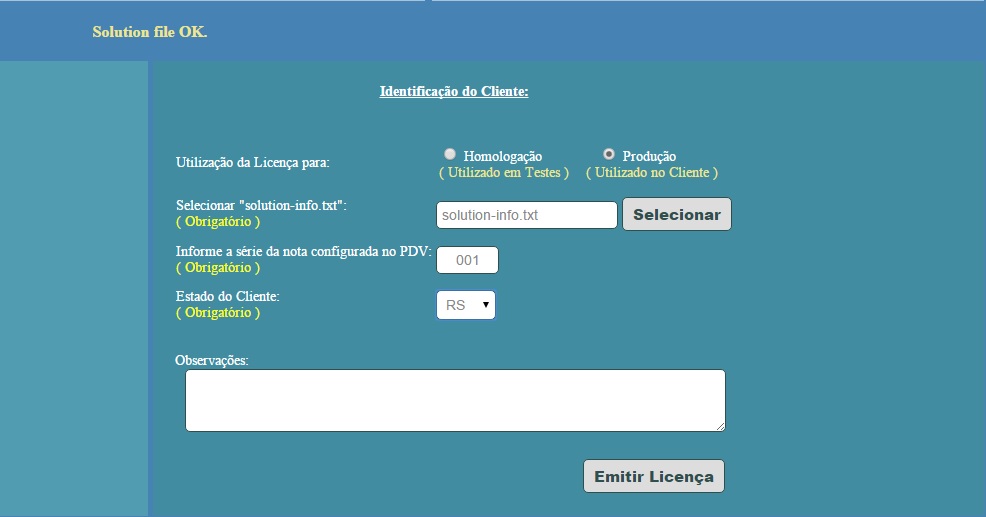
Na tela da direita há alguns campos que serão necessários preencher:
- Escolha o ambiente Produção
- Tenha em mãos o arquivo
solution-info.txtdo cliente, e indique o lugar onde ele está por meio do botão “Selecionar” - Informe a série usada no PDV.
- E o estado do cliente.
- Observações é um campo opcional.
- Após carregar o solution ele irá validar e se estiver tudo certo irá indicar a mensagem ali em cima, “solution file OK”
- Clique em “Emitir Licença”, após isso ele automaticamente iniciará o download o arquivo
settings.bin.
Migrado da wiki (
bematechnfce_renovacaodelicenca). Última edição em 08/11/2017; autores: cassol.

Hello! It looks like you're interested in this conversation, but you don't have an account yet.
Getting fed up of having to scroll through the same posts each visit? When you register for an account, you'll always come back to exactly where you were before, and choose to be notified of new replies (either via email, or push notification). You'll also be able to save bookmarks and upvote posts to show your appreciation to other community members.
With your input, this post could be even better 💗
Cadastrar Login